Money · checklist · PR440
NSLSC MSFAA signing checklist
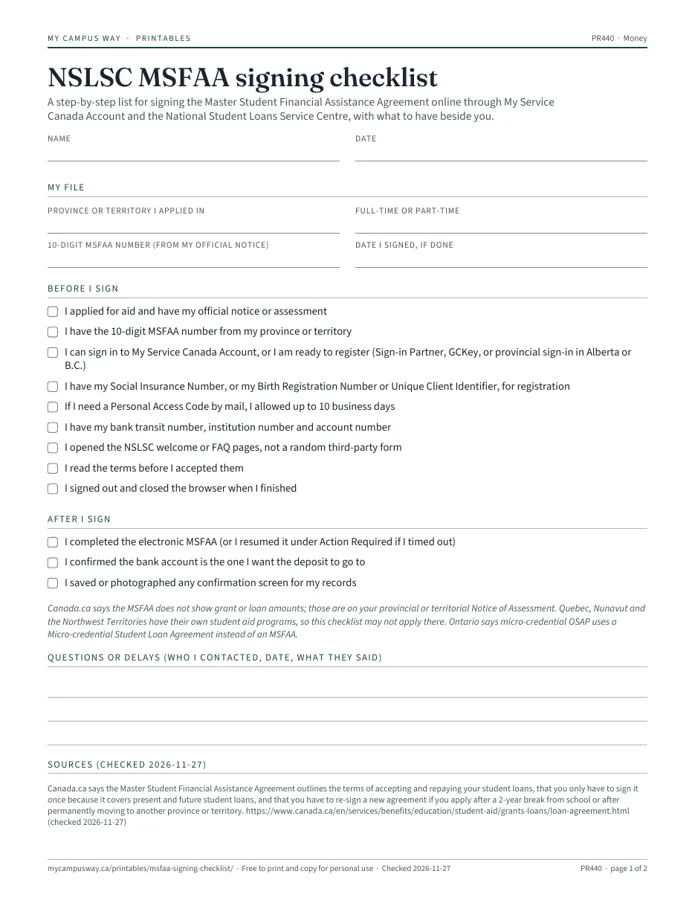
A step-by-step list for signing the Master Student Financial Assistance Agreement online through My Service Canada Account and the National Student Loans Service Centre, with what to have beside you.
Download
- PDF, US Letter (fillable) · 52 KB
- PDF, A4 (fillable) · 52 KB
- Word (.docx), editable · 39 KB
- Excel (.xlsx), editable · 8 KB
The PDFs have fill-in boxes you can type into in a PDF reader, or print and write by hand. Both sizes print without scaling. The Word and Excel files are yours to change. Nothing is sent to us.
How to use it
- Get your 10-digit MSFAA number from the province or territory you applied with.
- Register or sign in to My Service Canada Account, then open NSLSC.
- Have your bank transit, institution and account numbers ready.
- Read the terms, accept them, and keep a record. If you time out, sign in again and use the Action Required link.
What's on the sheet
My file
- Province or territory I applied in
- Full-time or part-time
- 10-digit MSFAA number (from my official notice)
- Date I signed, if done
Before I sign
- I applied for aid and have my official notice or assessment
- I have the 10-digit MSFAA number from my province or territory
- I can sign in to My Service Canada Account, or I am ready to register (Sign-in Partner, GCKey, or provincial sign-in in Alberta or B.C.)
- I have my Social Insurance Number, or my Birth Registration Number or Unique Client Identifier, for registration
- If I need a Personal Access Code by mail, I allowed up to 10 business days
- I have my bank transit number, institution number and account number
- I opened the NSLSC welcome or FAQ pages, not a random third-party form
- I read the terms before I accepted them
- I signed out and closed the browser when I finished
After I sign
- I completed the electronic MSFAA (or I resumed it under Action Required if I timed out)
- I confirmed the bank account is the one I want the deposit to go to
- I saved or photographed any confirmation screen for my records
Questions or delays (who I contacted, date, what they said)
- 3 lines to write on
Sources
- Canada.ca says the Master Student Financial Assistance Agreement outlines the terms of accepting and repaying your student loans, that you only have to sign it once because it covers present and future student loans, and that you have to re-sign a new agreement if you apply after a 2-year break from school or after permanently moving to another province or territory. Source · checked 2026-11-27
- Canada.ca says the MSFAA will not show grant or loan amounts, and that your Notice of Assessment from your province or territory tells you how much student aid you will receive. It also says borrowers in Nunavut, the Northwest Territories and Quebec need to check with those governments, which have their own student aid programs. Source · checked 2026-11-27
- The National Student Loans Service Centre says that if this is your first time receiving funding you need to register your account and complete the electronic MSFAA, and that you must register for a My Service Canada Account to access your NSLSC account. To complete the MSFAA online you need your financial institution information: transit number, institution number and account number. Source · checked 2026-11-27
- The NSLSC says a Personal Access Code from Service Canada can take up to 10 business days to arrive by mail if you cannot use Interac verification with a listed bank, and that you should register as early as possible to avoid delays. Source · checked 2026-11-27
- The NSLSC says your MSFAA number is provided by your province or territory of issue, that completing the agreement online takes 5 to 10 minutes, and that if you time out you should sign in again through My Service Canada Account and use the MSFAA link under the Action Required banner. Source · checked 2026-11-27